Getting a quiz score is just the beginning. The real learning happens when you understand why you got something right or wrong. That's exactly why we built the Quiz AI Assistant-an intelligent chatbot embedded directly into your quiz results page.
No more guessing. No more searching through notes. Just ask the AI, and get a clear, contextual answer in seconds.
What Is the Quiz AI Assistant?
The Quiz AI Assistant is an AI-powered chatbot that appears on every quiz result page in Quizflex. It already knows your quiz topic, your score, which questions you answered correctly, and which ones you missed. You can have a natural conversation with it to:
- Understand why certain answers are correct - Get detailed breakdowns of the right answer and the reasoning behind it.
- Find out why your answer was wrong - The AI explains exactly where your thinking went off track.
- Explore concepts you found difficult - Dive deeper into any topic covered by the quiz.
- Get additional context on quiz topics - Go beyond the question and learn related concepts, real-world applications, and study tips.
It's like having a personal tutor available the moment you finish a quiz.
How It Works
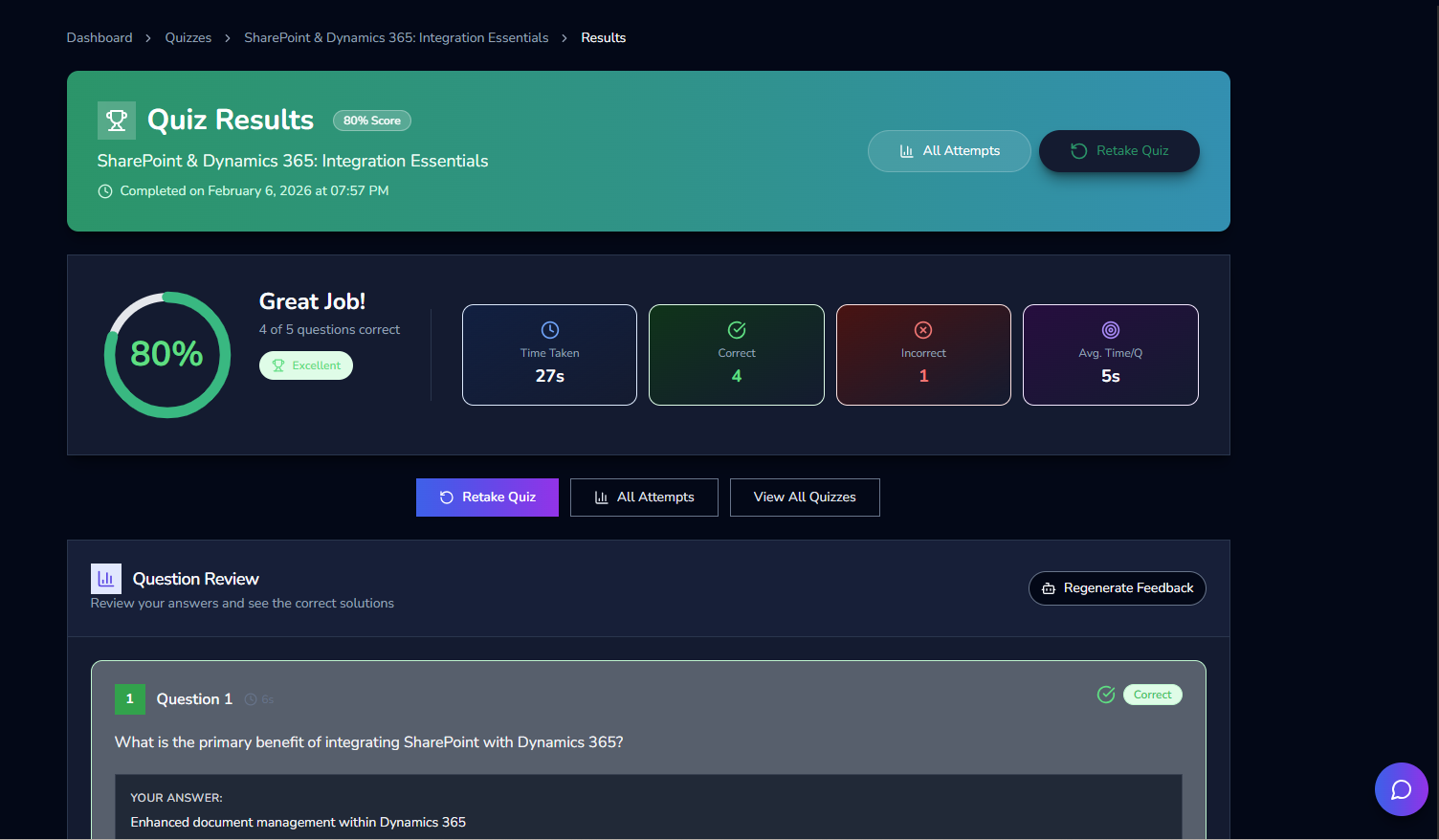
When you complete a quiz, your results page shows your score, time taken, correct and incorrect counts, and a full question-by-question review. In the bottom-right corner, you'll see the Quiz AI Assistant chat icon.
Step 1: Open the Chat
Click the chat icon on your results page. The AI Assistant opens in a sleek sidebar panel and immediately introduces itself. It already has full context about your quiz-your score, the topic, and every question you answered.
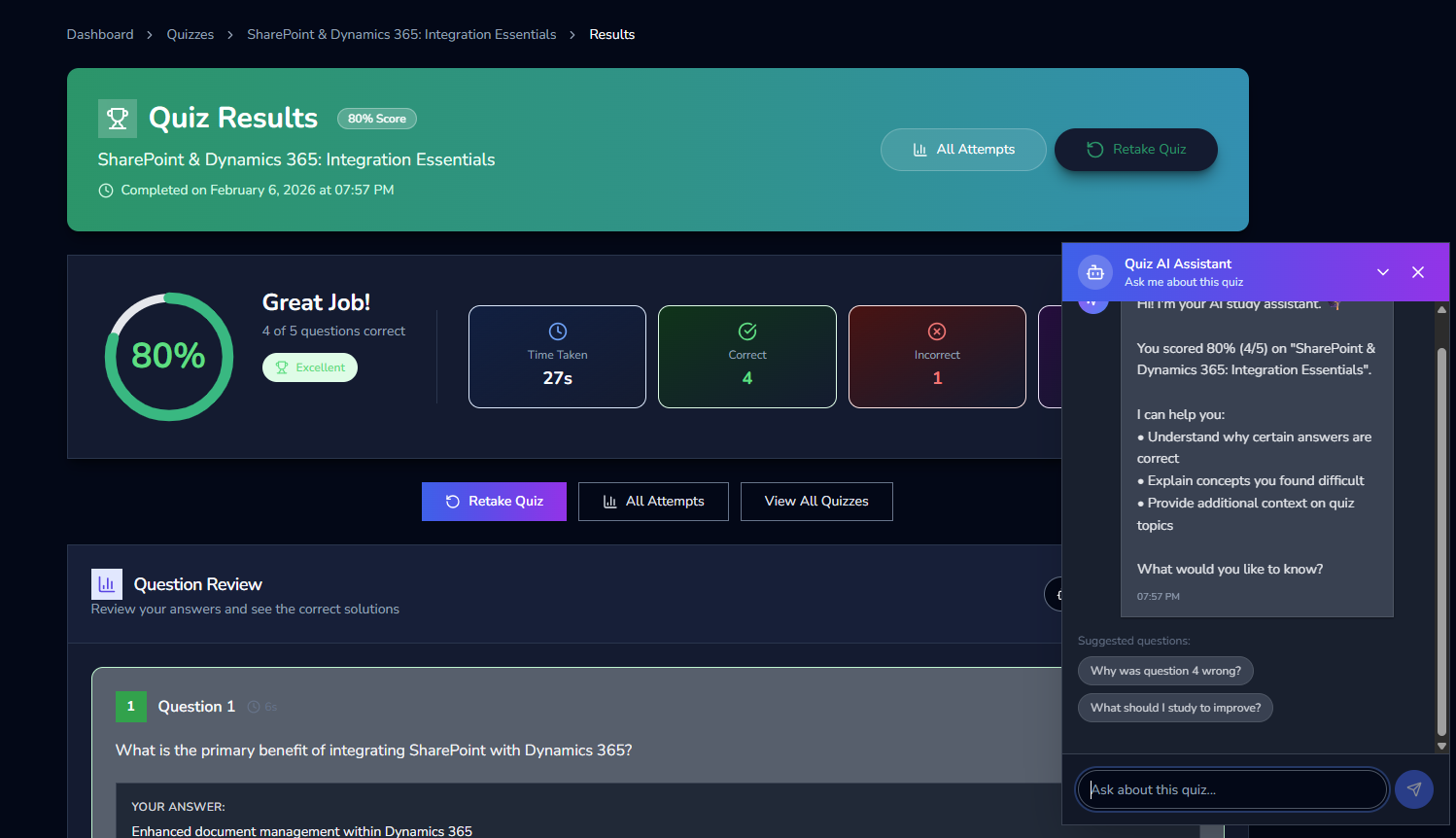
The assistant greets you with a personalized summary. For example:
"Hi! I'm your AI study assistant. You scored 80% (4/5) on 'SharePoint & Dynamics 365: Integration Essentials'. I can help you understand why certain answers are correct, explain concepts you found difficult, and provide additional context on quiz topics. What would you like to know?"
Step 2: Ask a Question
You can type any question about your quiz. The AI understands natural language, so you don't need special commands. Just ask things like:
- "Why was question 4 wrong?"
- "What should I study to improve?"
- "Explain the difference between the two answer choices for question 3"
- "Can you explain SharePoint permissions in more detail?"
Step 3: Get a Detailed Explanation
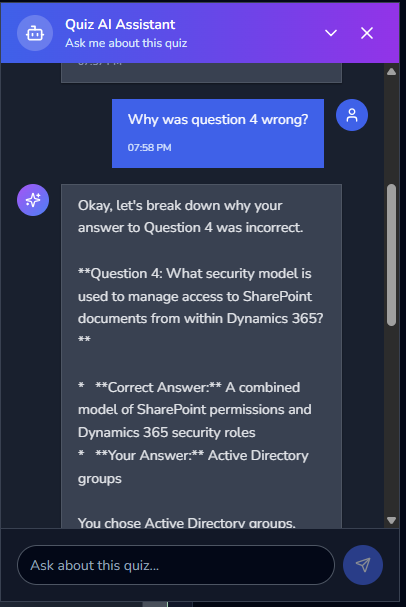
The AI responds with a thorough, structured explanation. For example, if you ask "Why was question 4 wrong?", it will:
- Show you the original question - e.g., "What security model is used to manage access to SharePoint documents from within Dynamics 365?"
- Reveal the correct answer - e.g., "A combined model of SharePoint permissions and Dynamics 365 security roles"
- Show your answer - e.g., "Active Directory groups"
- Explain the reasoning - The AI breaks down why the correct answer is right and why your choice was incorrect, giving you the conceptual understanding you need.
This isn't a generic explanation-it's tailored to the exact question, your answer, and the quiz topic.
Suggested Questions
Not sure what to ask? The AI Assistant provides suggested questions to get you started:
- "Why was question 4 wrong?"
- "What should I study to improve?"
These are dynamically generated based on your specific results, so they're always relevant.
Why This Changes How You Study
Traditional quiz platforms give you a score and maybe highlight the correct answers. But they leave the most important part-understanding-up to you. The Quiz AI Assistant fills that gap:
Immediate Feedback Loop
Research shows that immediate feedback is one of the most effective learning strategies. The AI Assistant provides explanations the moment you need them-right after you finish the quiz, while the questions are still fresh in your mind.
No Context Switching
You don't need to open a textbook, search Google, or ask a teacher. Everything happens on the same page where you see your results. This keeps you in the learning flow and reduces friction.
Personalized to Your Mistakes
The AI focuses on your specific errors. Instead of reviewing an entire chapter, you get targeted explanations for exactly what you got wrong. This is more efficient and more effective.
Deeper Understanding
Asking "why" forces active recall and deeper processing. When you engage with the AI in a conversation, you're not just passively reading-you're actively thinking about the material, which strengthens memory retention.
Who Benefits from the Quiz AI Assistant?
Students
After completing a practice quiz, students can immediately ask about confusing questions. This is especially powerful for self-study sessions when a teacher isn't available.
Corporate Learners
Employees taking compliance or training quizzes can understand the reasoning behind correct answers, making the training more meaningful than a simple pass/fail score.
Educators and Trainers
Teachers can point students to the AI Assistant for self-guided review, freeing up time for more personalized instruction during class.
Certification Prep
If you're preparing for a professional certification, the AI Assistant helps you understand the "why" behind each answer-exactly the kind of deep knowledge certifications test for.
Privacy and Data
The Quiz AI Assistant only has access to the quiz you just completed-your questions, answers, and score for that specific quiz. It does not access other quizzes, personal data, or information outside the quiz context. Your conversations with the AI are used to generate responses in real time and are not stored or shared.
How to Access It
- Take any quiz on Quizflex.
- View your results - the results page loads automatically after you submit.
- Click the chat icon in the bottom-right corner of your results page.
- Start asking questions - type naturally or use the suggested questions.
That's it. No setup, no extra cost on supported plans, no configuration. The AI Assistant is ready the moment you need it.
Tips for Getting the Most Out of the AI Assistant
- Be specific: Instead of "explain question 3," try "why is option B wrong for question 3?" - the more specific your question, the more targeted the answer.
- Ask follow-up questions: The AI remembers the conversation context, so you can go deeper. Ask "can you give me an example?" or "how does this apply in practice?"
- Use it for review: After finishing all your quizzes for the day, go back to the ones you scored lowest on and chat with the AI about your weak areas.
- Combine with retakes: After the AI explains your mistakes, use the Retake Quiz button to test yourself again. This combination of explanation + practice is proven to boost retention.
Summary
| Feature | What It Does |
|---|---|
| Contextual AI Chat | Knows your quiz, score, and every answer - no need to explain what you're asking about. |
| Wrong Answer Explanations | Breaks down exactly why your answer was incorrect and what the right answer is. |
| Concept Deep Dives | Go beyond the question to understand the underlying topic. |
| Suggested Questions | Smart prompts based on your specific results to get you started. |
| No Setup Required | Available on every quiz result page - just click the chat icon. |
The Quiz AI Assistant turns every quiz into a learning conversation. Instead of just seeing a score, you walk away understanding the material. Try it on your next quiz - finish, click the chat icon, and start asking questions. You might be surprised how much more you learn.
Topics covered
- AI
- Chatbot
- Quiz Feedback
- Education
- Study Tools
- AI Assistant
- Learning
- AI quiz generator
- quiz maker for teachers
- study tips
Frequently asked questions
What is Meet the Quiz AI Assistant: Your Personal Chatbot for Instant Quiz Feedback and Explanations?
How do I study Meet the Quiz AI Assistant: Your Personal Chatbot for Instant Quiz Feedback and Explanations effectively?
What is the best AI quiz tool for Meet the Quiz AI Assistant: Your Personal Chatbot for Instant Quiz Feedback and Explanations?
How can I practice Meet the Quiz AI Assistant: Your Personal Chatbot for Instant Quiz Feedback and Explanations with QuizFlex AI?
Is QuizFlex AI free for students and teachers?
Stay in the Loop
Get weekly tips on AI-powered learning, quiz strategies, and product updates. No spam, unsubscribe anytime.
Quizflex for Language Learning: A Practical Approach to Mastering Vocabulary and Grammar
5 Ways to Use Quizflex for Effective Study Sessions
Related Articles
Continue learning with these related posts
Presentation Gallery: Explore AI-Generated Slide Decks from Our Community
Quizflex now includes a Presentation Gallery where you can explore AI-generated slide decks published by our community. View presentations on education, business, science, medicine, and more - with professional layouts, diagrams, and rich visual content.
How AI Quiz Generation is Revolutionizing Education
Learn about how ai quiz generation is revolutionizing education and how Quizflex can help you create engaging quizzes.
How AI Quiz Generation is Revolutionizing Education
Learn about how ai quiz generation is revolutionizing education and how Quizflex can help you create engaging quizzes.